Which app for payment links could be quick and easy to set up?

Products featured
You’re getting ready to launch your business. After months of stocking inventory, writing product descriptions, and running social media campaigns, the last thing you need is to find out that your payment system will take a long time to get set up.
What you need is an easier way to get paid: for example, an app that enables payment links and that’s quick and easy to set up, so that you can start accepting sales right away.
In this article, we share how to choose a payment app with payment links and fast onboarding, including what features to look for as well as common mistakes to avoid. We also introduce you to Ziina, a payment platform that helps UAE-based businesses launch payments in as little as 48 hours.
How to set up a payment app for payment links
Setting up a payment app is usually a straightforward process, but the exact steps can vary depending on the provider you choose. For example, you might need to:
- 1.Create an account: Download your provider’s app and create a profile, or sign up online.
- 2.Complete verification: Your provider may ask you to submit verification documents, such as your Emirates ID, passport, or visa, as well as your business registration information before you can start accepting payments.**
- 3.Wait for approval: Onboarding times can vary, so it’s worth checking how long verification is likely to take before you sign up.
- 4.Create your first payment link: Once your account is approved, you can enter the payment amount, add any relevant details, and create your first payment link.
- 5.Start sharing and getting paid: Share your link through social media, email, text message, or other channels.
The whole process can be quick and easy with the right provider. Before signing up, make sure to check which documents you’ll need and how long approval typically takes so you can avoid unexpected setup delays.
Ziina is a payments app in the UAE that helps you onboard quickly & create and send payment links to your customers. Want to try it out? Sign up today.
What features should you look out for based on your use case?
| Use case | Feature |
|---|---|
Social media seller | You’ll likely want payment links that can be used by multiple people at once – that way you can add your payment links to Broadcast lists or Social Stories and collect payments in bulk. |
Freelancer | As a freelancer, you might want to look for payment links that you can embed into your invoices. This offers your client a simpler, faster way to pay you than waiting for payroll day. |
E-commerce business | You might want to customize your payment links to suit your business. Some payment links let you add or remove fields like tipping, VAT, order notes, or delivery address information. |
Brick-and-mortar store | If you’ll be sharing payment links in person, you might want to look out for providers that offer in-person QR code stands so that you don’t need to manually send a payment link to each customer. |
International seller | If you deal with clients outside the UAE, offering multi-currency support might be useful for you. You might want to choose an app that presents prices in local currencies while settling funds into your account as AED. |
Read more: Payment links: How to accept payments online without a website
4 mistakes to avoid when choosing an app for payment links based on setup speed
It’s worth being aware of a few common mistakes that businesses can make when choosing an app for payment links with faster onboarding:
- Not checking payout times: Payout times dictate how long it takes to withdraw money from your payment app to your bank account. Quick onboarding does not guarantee quick cashouts, so check with each provider – especially if you need a quick stream of income to access your earnings.
- Focusing on setup speed over features: Onboarding speed is important – but it only matters when you’re first starting out. It’s worth considering what features you need your payment app to have, and then choosing a provider accordingly. Slow link generation or awkward app interfaces will slow you down every single day.
- Not confirming pricing or fees: Choose a provider that offers transparent pricing, and check whether they use a subscription model, a per-transaction fee model, or a combination of both. You might also want to verify fees for taking international payments before making a final choice.
- Not thinking about scalability: A simple, manual payment link setup might work fine now, but as your business grows, you might want to adjust or automate your workflow. Having access to features like multiple payment methods, international currency support, custom checkout options, and reusable payment links can become increasingly useful over time.
Get set up quickly with Ziina’s payment links
Ziina is a UAE-based payment app that helps e-commerce businesses, freelancers, and pop-up vendors get paid quickly with payment links and other payment options, such as a payment gateway, Tap to Pay, or QR codes.
Our app is quick and easy to set up: you can register on your phone simply by uploading the necessary documents, sharing your business details, and verifying your identity. For example, our customer Stretch It Out managed to go live in just 48 hours with Ziina:
"Ziina enabled me to launch my business in record time. It’s fast, user-friendly, and local – a perfect solution for small businesses like mine," said the Founder and CEO of Stretch It Out, Dina Zoa.
Once you sign up with Ziina, you can also:
- Create payment links soon after signing up, and share them instantly across social media platforms like WhatsApp, Instagram, or Facebook. You can also create QR code payments.
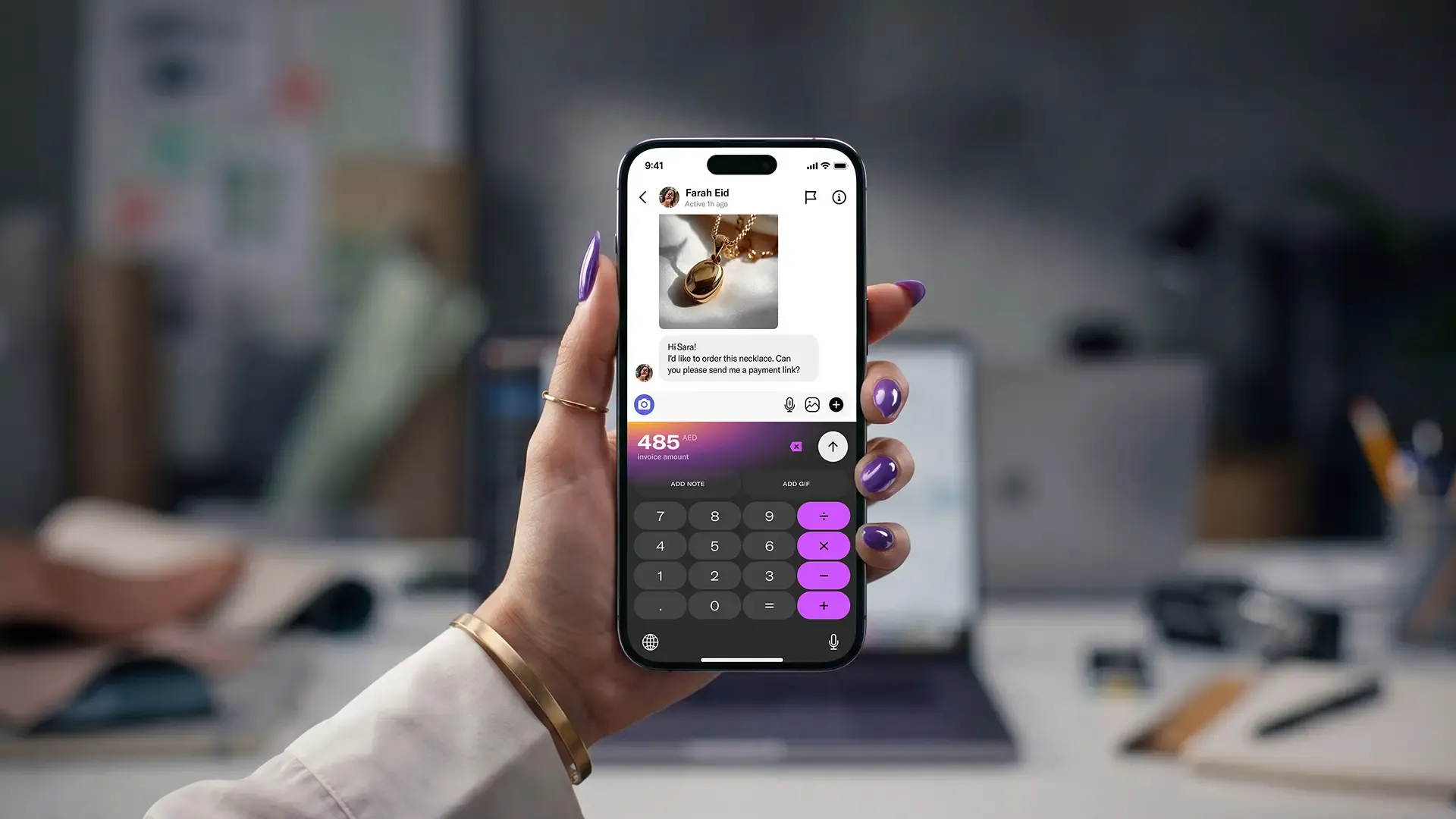
- Use the ZiiBoard – a patented custom keyboard that helps you create payment links without ever needing to leave the chat.
- Allow customers to pay with a card (Visa, Mastercard, Amex), Apple Pay, and Google Pay.
- Accept payments in up to 10 non-AED currencies, and have all payments instantly settle into your Ziina wallet as AED.
- Benefit from transparent pricing of 2.6% + 1 AED per transaction, with an added 1.5% fee for international cards.* Please check out our pricing page for more information.
- Edit your payment links after they’re live by toggling on and off fields like address collection, custom payment notes, international currency support, and tipping options.
- Cash out your funds to your connected bank account in just 1 – 2 business days for transfers under 25,000 AED, subject to bank processing times. 24h payouts are available for eligible users.
Final thoughts
Finding the right app for payment links isn’t always as simple as picking the one with the quickest set-up process. In this article, we’ve shared which features to look out for and what mistakes to avoid when you’re making your decision.
We’ve also shared how you can get set up with Ziina quickly and start creating payment links soon after – for example, our customer Stretch It Out was able to get up and running with payments in just 48 hours using our payment links.
*Disclaimer: Availability of Ziina products and features is subject to eligibility, successful verification, device compatibility, applicable transaction limits, Ziina’s terms and conditions, and regulatory requirements. Customers are responsible for ensuring they hold any trade license, permit, tax registration, or other approval required for their business activities. Fees, limits, payout timelines, and product features may vary and are subject to change. Please refer to Ziina’s latest terms and pricing for full details.
**Disclaimer: With Ziina, some users may be able to get started with basic verification, such as Emirates ID verification, but requirements may vary depending on the user’s business activity, transaction volume, account type, and applicable legal or licensing obligations. Customers remain responsible for ensuring they hold any trade license, permit, tax registration, or other approval required for their business activities.
This article was published in September 2026.